
Macy's: Shopping and Rewards
Macy's IncShopping
4.872.46K Reviews
- Version
- 2611.1.0
- Installs
- 10.00M
- Age Rating
- Everyone
Screenshots






Our Review of Macy's: Shopping and Rewards
 Analysis by Appyee
I approached Macy's: Shopping and Rewards as a practical shopping companion rather than just another store app. It is a free shopping app from Macy's Inc, aimed at browsing clothing, shoes, beauty products, and home items while keeping savings and rewards in the same place. That combination is useful when I already know what I want, but it also creates a few points where a purchase can feel less straightforward than walking into a store.
The app has been around since November 16, 2011, and its current version is 2608.3.0. It is rated for Everyone and supports devices running OS 9 or later. With an average rating of 4.8 from around 358 thousand ratings, and more than 10 million installs, it is clearly a well-established option rather than a little-known shopping experiment. I still think the best way to judge it is by the moments that matter: finding the right item, checking whether a deal really applies, and recovering smoothly when something does not behave as expected.
Where shopping usually gets stuck
The first friction usually appears before checkout. Macy's carries a broad mix of departments, so opening the app with only a vague idea such as “I need something for a wedding” can lead to a lot of browsing. I find it more efficient to start with a department, then narrow by the practical details that actually decide a purchase: size, color, brand, price range, and whether the item suits the occasion.
That approach matters especially for clothing and shoes. A product can look right in a general results list but become less useful once I check the available size or color. I prefer to treat the first screen as discovery and the product page as the real decision point. Before spending time comparing similar items, I check the selected options and read the visible purchase details carefully.
Beauty shopping has a different kind of difficulty. Shade, finish, and product type can be easy to confuse when moving quickly through a list. For home goods, dimensions and material matter more than a polished image. In both cases, I would not rely on the category thumbnail alone. The app is most helpful when I use it to organize choices, then slow down for the details of the specific product.
Deals and rewards are another common sticking point. Seeing a saving displayed near an item does not automatically mean it will apply to every combination of products in a basket. I treat offers as something to verify during the purchase flow, not as a promise that every item will receive the same reduction. This small habit prevents the most frustrating kind of surprise: believing I have finished comparing prices, only to discover that the final total needs another look.
My most useful rule is to separate product selection from offer selection. First I decide whether the item is right at its current value. Then I check the available saving or reward and see whether it changes the decision. That keeps a tempting promotion from pushing me toward an unsuitable size, color, or substitute.
What to check before blaming the app
If a page seems incomplete, I first check whether the problem affects one item or the entire shopping session. A single product may have limited options, while a wider problem can point to a temporary connection issue, an outdated app installation, or a session that needs refreshing. Closing and reopening the app is a simple first step, but I also revisit the same item through its department rather than assuming the first route was the only route.
Search terms can create their own confusion. A very broad phrase may return too many results, while a highly specific phrase may hide useful alternatives. I get better results by trying the department name, a product type, and then a brand or characteristic. For example, I might begin with a category, narrow it to the kind of item I need, and only then compare particular styles.
Before checkout, I review the basket as if I were checking a paper receipt. I confirm the item, variant, quantity, and visible price. I also look at the saving or reward information again instead of assuming it carried over from an earlier screen. If I am shopping for a time-sensitive event, I leave room for this second review rather than placing the order in a rush.
The operating-system requirement is worth checking when using an older device. The app supports OS 9 or later, so a phone below that threshold is not a good candidate for troubleshooting inside the app. On a supported device, keeping the operating system and the application current is still a sensible setup check, particularly when a screen loads incorrectly or a sign-in session behaves oddly.
A calmer setup for first-time use
My preferred setup is deliberately simple. I install the app, open it on a reliable connection, and begin by browsing rather than immediately building a large basket. This lets me see whether images, categories, and product pages behave normally before I commit to a longer shopping session.
I also decide in advance whether I am using the app mainly for browsing, for a specific purchase, or for keeping track of rewards and savings. Those are different jobs. Browsing benefits from flexible searching and comparison. A planned purchase benefits from writing down the required size, color, and budget first. Reward-focused use benefits from checking the account-related parts of the experience before I assume a saving is available to use.
When I create or use an account, I make sure I am returning to the same sign-in route each time. Switching between an account session and casual browsing can make it seem as though saved shopping activity or reward information has disappeared, when the real issue is that I am viewing the app in a different state. If something looks missing, I sign out only when necessary and then sign back in carefully, rather than repeatedly tapping through screens without knowing which session is active.
For a family purchase, I keep a short note outside the app with the intended sizes and acceptable alternatives. This is more useful than relying on memory while comparing several similar products. It also makes recovery easier if the basket changes or the app needs to be reopened. I can reconstruct the order from the note instead of starting the search from nothing.
Recovering a basket or a stalled shopping session
When a product page stops responding, I do not immediately repeat the same tap many times. I return to the department or search results, open the item again, and check whether the selected options are still visible. If the item is no longer in the same place, I use the product name or category details to find it again. This is slower than an ideal flow, but it is safer than assuming a tap succeeded.
A basket that looks wrong deserves a similar reset. I compare what is displayed now with what I intended to add, remove any duplicate-looking entry, and recheck the quantity. If a saving seems to have vanished, I inspect the offer information and the basket again before changing the product. In my experience, this order of checks helps distinguish a display refresh problem from an actual change in eligibility.
One practical recovery technique is to keep the shopping session small. Rather than adding every possible candidate, I shortlist a few items, compare them, and then continue. A compact basket is easier to audit, especially when shopping across clothing, beauty, and home departments in one visit. It also reduces the chance of accidentally purchasing a backup item that I had only meant to consider.
If the app closes or the session becomes unusable, I reopen it and retrace the last confirmed step. I do not assume that the last tap completed an action merely because the screen changed. I look for visible evidence that the item, option, or quantity is still present. This is a general recovery habit, but it is particularly valuable in a shopping app where a small misunderstanding can affect the final order.
For a realistic example, imagine I am looking for shoes and a small home gift before a weekend event. I would search and shortlist the shoes first, confirm the size and color, then move to the home category. After adding both, I would review the basket from the beginning rather than trusting that each department used the same selection flow. I would then check the savings and rewards information, verify the quantities, and only proceed once the basket matched my written plan.
When the app is not the actual cause
Not every failed shopping attempt is an application problem. A weak connection can affect images, search results, or the transition between pages. If other apps are also slow, I test the connection before changing anything inside Macy's. Moving to a more stable network and reopening the shopping session is a more sensible first response than repeatedly editing the basket.
Device storage and general performance can matter too. An older or crowded phone may struggle with image-heavy shopping pages even when the app itself is working normally. Closing unused apps, restarting the device, and making sure there is reasonable free space are basic steps, but they can reveal whether the problem follows the Macy's app or the phone as a whole.
There is also a difference between an item issue and an account issue. If one product cannot be selected, I investigate that product. If account information, rewards, or several parts of the shopping session look wrong, I check the sign-in state and connection first. Treating every problem as a product problem can lead me to abandon a good item unnecessarily.
I would also avoid making a purchase decision solely because a promotion appears attractive. A reward or saving is helpful only when the item itself fits the need and the terms visible in the shopping flow make sense. If I need a highly specialized product, the broad department coverage may not be enough, and a specialist retailer may offer better technical information or a more focused comparison. Likewise, if I want to compare many retailers in one place, a general marketplace can be more convenient than a single-brand shopping app.
How it compares with ordinary alternatives
Compared with visiting a Macy's store, the app is better for quietly comparing departments, checking options without walking between sections, and revisiting a product later. The store remains preferable when I need to feel fabric, test a beauty shade in person, or ask staff about a physical item. The app cannot replace those sensory and personal parts of shopping.
Compared with a general marketplace, Macy's gives me a more focused environment for its own clothing, shoes, beauty, and home selection. That focus can make the experience less chaotic than browsing unrelated sellers. The trade-off is range: a marketplace may make it easier to compare different retailers, while this app makes more sense when I specifically want Macy's products, savings, and rewards in one account context.
Compared with a mobile browser, the dedicated app feels more natural for repeated shopping sessions because I can return to the same store experience instead of starting from a blank browser tab. However, a browser can be the better fallback if the app is misbehaving on a particular device. I see the two as complementary rather than mutually exclusive: the app is my first choice for regular browsing, while the browser is a useful diagnostic alternative when I need to determine whether the issue is device-specific.
The app's strongest audience is someone who already shops at Macy's or wants one place for several familiar departments. It is also a good fit for a shopper who values checking savings and rewards during the same journey as product discovery. I would be less enthusiastic for someone who dislikes account-based shopping, needs highly technical product comparisons, or wants the widest possible cross-store price search.
My practical verdict after using it
I consider Macy's a capable shopping app with a clear purpose: it brings a large department-store selection, savings, and rewards into a mobile workflow. The high average rating and more than 10 million installs suggest that many shoppers find that workflow dependable, and I can understand why. It is free, suitable for Everyone, and the long release history gives it the feel of a maintained retail product rather than a temporary promotion tool.
My recommendation comes with one condition: use it deliberately. Start with a focused search, verify the product details, keep the basket manageable, and treat offers as something to confirm rather than assume. Those habits reduce most of the confusion I encountered and make the app much more useful for planned purchases.
I would choose it for browsing Macy's clothing, shoes, beauty, and home departments, especially when I want to compare options at home and keep an eye on rewards. I would skip it in favor of a store visit when touch, fit, or shade is the main concern, and I would use a broader marketplace when comparing many retailers matters more than staying within Macy's selection.
Overall, Macy's: Shopping and Rewards is worth trying if Macy's is already part of your shopping routine. Its value is not just in placing an order; it is in making a department-store visit easier to plan, compare, and revisit. With a careful final check of options, basket contents, and savings, I find it practical enough to recommend to a friend who wants convenience without giving up the familiar Macy's range.
Privacy and Permissions
See what permissions an app requests and how it handles your data.
- Identity
- find accounts on the device, read your own contact card
- Contacts
- find accounts on the device, read your contacts
- Location
- approximate location (network-based), precise location (GPS and network-based)
- Phone
- read phone status and identity
- Photos/Media/Files
- read the contents of your USB storage, modify or delete the contents of your USB storage
- Storage
- read the contents of your USB storage, modify or delete the contents of your USB storage
- Camera
- take pictures and videos
- Microphone
- record audio
- Wi-Fi connection information
- view Wi-Fi connections
- Device ID & call information
- read phone status and identity
- Other
- view network connections, connect and disconnect from Wi-Fi, full network access, control vibration, prevent device from sleeping
Verdict
Strengths of Macy's: Shopping and Rewards
- Wide selection of fashion, beauty, home, and designer products
- Frequent sales, coupons, and Star Rewards help reduce purchase costs
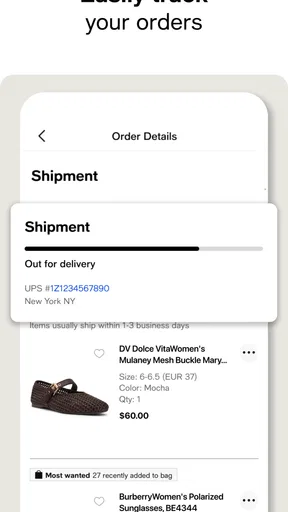
- In-app order tracking makes it easy to monitor deliveries
- Store pickup can save time and shipping fees on eligible items
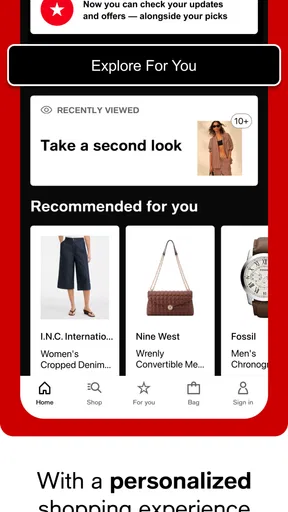
- Personalized recommendations make browsing more convenient
Limitations of Macy's: Shopping and Rewards
- Some deals require membership, specific payment methods, or minimum spending
- Product availability and prices may differ between the app and local stores
- Large catalogs can make finding specific items feel overwhelming
- Shipping times may vary when orders contain products from different sellers
- The app may send frequent promotional notifications unless settings are adjusted
Similar Picks in This Category
View All
SHEIN-Shopping Online
Roadget Business PTE. LTD.4.8

Amazon Shopping
Amazon Mobile LLC4.4


Mercado Libre: Compras online
Mercado Libre4.8

Wish: Shop and Save
Wish US Holdings LLC4.7

Alibaba.com - B2B marketplace
Alibaba Mobile4.4
Frequently Asked Questions
What can I do with the Macy’s: Shopping and Rewards app?
The Macy’s app lets you browse and purchase clothing, shoes, beauty products, home goods, jewelry, and seasonal items from your phone. During testing, the main shopping tools were easy to find, including search, product filters, size and color selection, saved items, order tracking, and store information. You can also view available rewards, promotions, and personalized offers when signed in to your Macy’s account.
Do I need a Macy’s account to use the app?
You can generally browse products, check prices, view store details, and explore some promotions without creating an account. However, an account is useful if you want to save favorites, manage payment and shipping information, review orders, track purchases, or access Macy’s rewards features. Some benefits and personalized offers may require you to sign in or link an eligible Macy’s account.
How do Macy’s rewards and offers work in the app?
The app can display rewards information, member benefits, coupons, promotional pricing, and personalized offers, depending on your account and eligibility. Not every discount applies to every product, and some offers have expiration dates, category restrictions, minimum purchase requirements, or exclusions. Before completing an order, open the offer details and confirm that the discount or reward has actually been applied.
Can I use the app to order online and pick up items in a Macy’s store?
For eligible products and participating locations, the app may offer store pickup or other local fulfillment options in addition to standard shipping. Availability depends on inventory, store location, product type, and the selected size or color. Pickup instructions, estimated readiness times, and identification requirements can vary, so review the order confirmation carefully before visiting the store.
Is the Macy’s app free to download, and what permissions does it require?
The Macy’s: Shopping and Rewards app is typically free to download, although purchases, shipping charges, taxes, and other order-related costs still apply. It may request access to notifications, location, camera, or account-related information to support alerts, store discovery, barcode or visual shopping features, and personalized experiences. You can usually manage optional permissions through your Android or iOS settings.
